
User:Kim/Prototyping 2nd year/GitPub
| prototype status | v2 basic .py script running |
| next steps | sort files + add print output to .py script |
| pmomm | #1. gitpub |
v 0.1
utilizing the Git API.
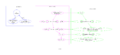
gitpub v1 scripts
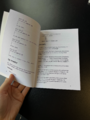
gitpub v1 printed prototype


I manged to print a proof of concept version of my personal reader repository but ran into a lot of issues:
- API needs personal token authentication (which limits it to personal use)
- using curl (to json) is limiting in formatting options (v1 is very 'crafty')
- sorting the files and directories is tricky and you prob. need to do it manually by passing numbers to the titles
v 0.2
I dont need the Gitlab APi, since most meta info is already stored in my local repository.
try python script >> better to turn into a program (pip install gitpub) using uv
find the python script here here
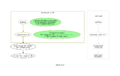
gitpub.py (v2) script

wip ref
- https://thelinuxcode.com/git-log-command-in-git/
- Git internals are explained further in this (very compelling) chapter called Plumbing & Porcelain (referring to underground / lower level commands vs the more user friendly / surface commands like git commit etc) >> it gets very complicated very quickly
- The architecture of open source application version 2 Git by Susan Potter
where is the local information stored?
in the repository, commit messages can be found in
.git/logs/refs/heads/main
they are structured like this:
0e55d65009ff9617a72b0eafc908e356a8344bb4 5567bfffaad5ab96941b2cd7ed8aa077c2df1e94 Kim Kleinert
<mail@kimkleinert.com> 1759126065 +0200 commit: r w o t synopsis
while when typing git log the output is formatted as the following: (git log documentation)
commit 5567bfffaad5ab96941b2cd7ed8aa077c2df1e94 (HEAD -> main, origin/main)
Author: Kim Kleinert <mail@kimkleinert.com>
Date:   Mon Sep 29 08:07:45 2025 +0200
   r w o t synopsis
viewing the same commit in the gitlab interface reveals that 5567bfffaad5ab96941b2cd7ed8aa077c2df1e94 is the SHA while 0e55d65009ff9617a72b0eafc908e356a8344bb4 is indicated as the parent (which usually indicates the previous commit). that still leaves this string 1759126065 inside the git log file view unknown.
how can I get it?
>> use the git log cmd
to get log from specific file: $ git log file/path/name.md
options:
- view diff by adding
-p --onelinedisplays only hash and message in one line--pretty=format:"..."documentation flag to have more control over formatting outputgit log --pretty=format:"%s" queue.md(this only print commit message),--pretty=format:"%an: %s"( author name and commit message) and adding%asfor date--statto get only the amount of changes not the full diffs
>> use python library$ pip install GitPython? this "provides a higher-level API for interacting with Git repositories" and is recommended for more complex interactions with git
or start with subprocess (more general for bash) or os >> why am i using python again?
in between questions and steps
- display filenames in final pdf (headers?)
- make it editable collectively (display merging branches, user names)
- file sorting before or with pandoc
- expand file formats
- make it terminal interactive: let user choose file formats (not only .md)
- in bash this could work to get the file contents into
.md cat style.css > out.md(does it preserve formatting?)- and the python equivalent
- expand styling: how do the commits interfere with/ relate to the main printed text?
- look into pandoc templates
v 0.3
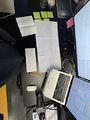
trying to figure out gitpub2.py on 3 different paper media and 2 screens
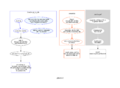
gitpub v0.3 graph


changes made:
- accepts user input to choose file formats (only .html and .md work)
- tested on different repository (make copy, add .py script, template.html and css file)
- runs without virtual environment (but needs pandoc, weasyprint and pdfbook2 preinstalled)
- first builtin conditionals (prevent converting hidden files and dirs)
- metadata use in v 0.3:
- markdown to single html then glob html
- add metadata (title) in the pandoc cmd to html
- use of 2 custom html templates, applied for each text and -cm files
- running headers (from filetitles) using print css and custom template class
- book title from cwd name
changes to make for mock assessment:
- move new templates and script to writing-from-the-middle-copy directory
- styling:
- adjust margins for printing
- format / position metadata (to the side? larger than main text? possibilities to keep its formatting / line breaks -- adjust in .py script?)
- cover with repository title (and url would be cool)
- bind
practical info
markdown metadata
- pandoc accepts metadata in yaml: (can be added as separate yaml file or inline .md document)
---
title: document
author: kim
---
- it is also possible to add a title block
% title
% author(s) (separated by semicolons)
% date
without editing .md files directly, I can pass metadata to the file by using this markdown command pandoc -s --template ./template.html --metadata title="$title" "$oldname" -o "$newname" found here
templates
- pandoc lets you add [1] for standalone documents (-s)
- github repo with all pandoc default templates
- to test which template you are currently using
pandoc -D html(exchange html with respective format converting to)
formatting
- in the script i could run different templates on -cm.md files than original .md files for styling differently, experiment with merging
- doing it really properly: pass all the git metadata to markdown file as yaml metadata > that way I can style it well with a custom template
v 0.4
main changes
- pandoc is now only running once: converting
.mdor.html(so far) to individual .html file - gitlog output / metadata for each file is written to
.yamlfile (instead of -cm.md) - added citation rendering option (--citeproc)