
User:Kiara/PTMoMNbM
Projects That May or May Not be Made
Typotek
What is it?
- A locally-running font-library, to display all the fonts I have installed on my computer so I can easily visualize them and choose from my collection when I need to.
- [edit on 21-05-2025] This will be done on my new Linux laptop, as it will be able to run apache (serve PHP) and the font managing might be way easier. The question is: should I publish it online so I can access it from anywhere? Probably yes, at least until I figure out how to dual boot my main laptop.
Why make it?
- Because windows is shit and doesn't provide a good way to sort and visualize installed fonts.
- I still haven't found an external app that suits my needs.
Workflow
- ⚹ Install the new fonts I collected
- ⚹ Make sure every font has a stylesheet and web formats
-
- > For this, use transfonter
- ⚹ Start a web project, probably based on Julien Bidoret's repository
-
- > I contacted Julien because his code is currently broken, waiting for an answer...
- >
This step needs a deep dive into PHP and why it is not working anymore
- ⚹ Make sure that the project is hosted on codeberg for archive and versioning!
Timetable
Clean up and font installation ~ 1 full day TBD Verify and update stylesheets and web formats ~ 3 days TBD Chat with Julien to make the code work again a few days maybe? in progress Fix PHP half a day to a day DONE! Fill the website with font-files and adapt categories ~ 2 days TBD Bug fixing ~ 1 day TBD
Previous Practice
web desiiiiiiiiiign <3
- ⚹ Smol contribution to Raphaël Bastide's Use&Modify (using ProcessWire)
- ⚹ Trials to actually make this have been running for a year(?) now...
-
- > I lost my database, remember?
Relations to Wider Contexts
- If there is no tool, make it! → Strong ties to the F/LOSS way of thinking
Choices Made
- ⚹ Filters
-
- > font family (serif, sans, mono, etc.)
- > variable
- > complete charset / missing diacritics
- > made by wxmen
- > license model
- >
- ⚹ Info displayed
-
- > Name of the font
- > Foundry
- > F/LOSS or paid license
- > Designer(s) + wxmen/queer indication
- > Text input to test the font on different chunks of text
- >
Rapid Prototypes
Write one sentence instruction for a work.
Make it.
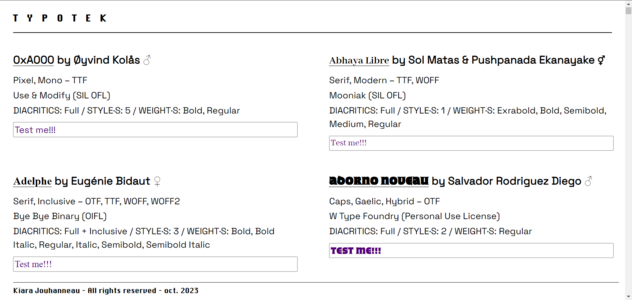
Screenshot of what the first draft looked like (2023)
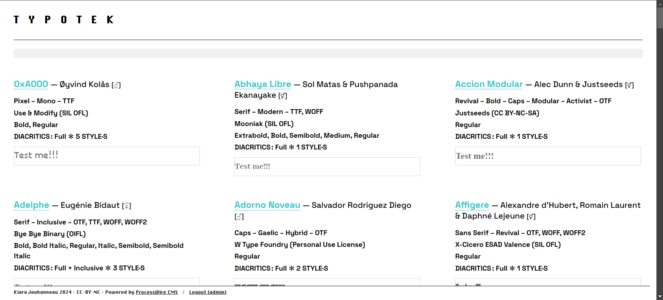
Another screenshot from before I lost the database (2024)


Dual booting
What is it?
- Installing Linux on a laptop alongside Windows
Why make it?
- Windows sucks but I still need it for some graphic design works
Workflow
- ⚹ Set a date for the install party
- ⚹ Open registrations
- ⚹ Make a wiki page for documentation (this is a good inspiration)
- ⚹ Find a good (online) guide
- ⚹ Make a back-up of the laptop's content
- ⚹ Do the workshop
- ⚹ Document the workshop
- ⚹ Enjoy the newly installed Linux!
Timetable
Making the wiki page ~ 15mn TBD Finding a guide to dual-booting a day or more? TBD Making a back-up of the laptop's content 1 day TBD Workshop duration 1 day TBD Documenting the steps on the wiki ~ 1 day TBD
Previous Practice
- ⚹ Messing around in the terminal in Prototyping classes
- ⚹ Installing WSL on my laptop
- ⚹ Attending the JdLL in 2023
Relations to Wider Contexts
- See my research topics leads here
Choices Made
- ⚹ Which Linux distribution? Debian 12
- ⚹ Date of the workshop
-
- > Is it better to wait for Windows to drop Windows 10 (october 2025) or does the date not really matter?
- ⚹ Deciding on which guide to use
- ⚹ Inviting an install-party expert?
Rapid Prototypes
- This will not be prototyped, here will be some pictures from the workshop instead.
Dual Booting: Personal Journey
On July 20th 2025, I started my own journey into dual booting. It didn't go so well, but in the end I succeeded!
| Steps | Problems | Troubleshooting | Success? |
|---|---|---|---|
| Flashing a USB drive with the right ISO image (arm64) | - | - | Yes |
| Windows entire backup and cleaning | - | - | Yes |
| Partitioning the SSD to welcome the Linux OS | Partition management is a nightmare | Using Paragon allowed to partition smoothly | Yes |
| Booting into the USB flash drive to install Linux | The Debian installer doesn't see the SSD | Here begins the troubleshooting journey that takes 2 days :) it is detailed below | Yes!! |
| Getting my data back | It seems the disk doesn't have enough space wtf | Following this tutorial solved the problem :) | Yes |
| Setting up the file sharing system to access files from both OS without having to duplicate them | - | - | WIP-TBD |
Solve the invisible SSD problem
Here are the steps I followed in order to fix this problem:
- Disabling fast startup from windows - INEFFICIENT
- Changing the SATA HDD type to AHCI from the BIOS - SHOWS THE DISK BUT NO THE PARTITIONS + BREAKS WINDOWS
- I realized shortly after that the partition had not been made... so I did it again, but the SSD was still not showing (I also put the HDD back to its previous state).
- I went back to the BIOS to put the HDD into AHCI again, Windows breaks completely
- Reinstalling Windows... Reflashing the USB with Debian cause the USB drive was also partitioned for no reason...
- Safe boot and AHCI - WORKED
- Turn on the safe boot with
bcdedit/set {current} safeboot minimalin an admin run terminal (windows) - Restart and put HDD in AHCI in the BIOS
- Restart again and disable safe boot with
bcdedit/deletevalue safebootin an admin terminal - Hold shift and restart, then hit ESC to choose the booting option and run the Debian installer again!
- Turn on the safe boot with

- In the debian installer: SSD shows, I could run the manual partitioning and do the following:
- Choose the partition
- Rename it as "debian_root" and set "use as: Ext4 file system"
- Create a new partition from the previous one (a small one)
- Choose the auto config option and write changes
- Installation works!!
- In the debian installer: SSD shows, I could run the manual partitioning and do the following:
18-09-2025 EDIT
The dual boot works well BUT sometimes (too often) my laptop freezes as soon as it starts. To "solve" this I have to force turn it off and turn it on again. Sometimes I have to do this 5 times in a row for the laptop to actually start... (:
Bachelor thesis website
What is it?
- A website to display my first bachelor's thesis, in French and English.
Why make it?
- Now it is only available as a very complex to make printed object, I want to have it easily readable and PDF sucks. HTML is always the best solution.
Workflow
- It is in progress at the moment, so here are the remaining steps to follow
-
- ⚹ Finish importing the content in the website (HTML)
- ⚹ Resolve the display conflict
-
- >
masonryhas not been implemented in the CSS specs yet, and it actually is what I need :(
- >
- ⚹ Make it responsive
- ⚹ [optional] Add a CSS-print option?
- ⚹ Translate it
- ⚹ Publish it online and link it on my website
-
- > This needs a big dive into URL manipulation, and probably will have to wait until I change my hosting provider
Timetable
Finish importing the content in the website ~ 1-2 days TBD Resolve the display conflict several days TBD Make it responsive ~ 1-2 days? TBD Translate it ~ 1 week TBD Publish it online and link it on my website ~ 1 week (includes host change) TBD Add a CSS-print option? couple of weeks? TBD
Previous Practice
- ⚹ Writing the thesis (2021)
- ⚹ Webdesign
- ⚹ CSS-print
- ⚹ Learning new web standards everyday
Relations to Wider Contexts

- ⚹ Thesis writing, which I will be doing again soon!
- ⚹ Research
- ⚹ Graphic design x Web design x Print ..... when they merge .....
- ⚹ Publishing
- ⚹ Letting go of the impostor syndrome
Choices Made
- Choices in design related to the content and the print version
-
- > Colors, fonts, display/layout
Rapid Prototypes
- ⚹ Try different displays until finding the right one (has to be responsive)
-
- > Grid
- > Flex
- > Table
- > Hack???
- ⚹ Translate a section everyday for a week
Expanding my wiki
What is it?
- A very precise expansion of the wiki content through documentation, writing, detailing
Why make it?
- ⚹ To get more familiar with un-self-censored writing
- ⚹ To get the habit of documenting
- ⚹ To keep a schedule in a way
Workflow
- ⚹ Write
- ⚹ Write
- ⚹ Write
- ⚹ Edit
Timetable
404 NOT FOUND
Previous Practice
404 NOT FOUND
Relations to Wider Contexts
- ⚹ Thesis writing
- ⚹ Research
- ⚹ Publishing
- ⚹ Letting go of the impostor syndrome
Choices Made
404 NOT FOUND
Rapid Prototypes
- ⚹ Write notes where ever and transpose them in the wiki
- ⚹ Watch a movie actively
- take notes, link references
- ⚹ Read a text/book actively
- take notes, link references
- ⚹ Listen to a talk/podcast/... actively
- take notes, link references
Team PTMoMNbM
from the 07-05-2025 Methods class (https://pad.xpub.nl/p/070525_Methods)
✦ teaming up with Claudio & Eleni (https://pad.xpub.nl/p/eleni-kiara-claudio-pmomm) we went on with our Schiedam adventure ✦

