
User:Kim/Special Issue 27/uptime
project page
for more loose thoughts go to Timekeeping device

Pad w/ Claudio
tests path on cerealbox: /var/www/html/SI27/kim-claudio
ideas
- glossary on bash commands --> as starting points for exploration of connections, words, software, hardware, time labor
- cerealbox opening page with stats
- a small server manifesto for cerealbox
- publish in the terminal --> weasyprint
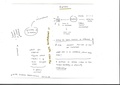
conversation with claudio
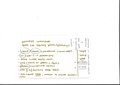
bash command notes
Intro
$ uptime is a command that returns set of values involving, the current time, and the amount of time system is in running state, number of users currently logged in, and the load time for the past 1, 5 and 15 minutes respectively (on linux the command comes with options).
Running $ uptime on your local terminal will output these values for your computer. logging into a server and running $ uptime will respond with the servers stats.
Uptime is generally used as a measure for system reliability (yes please question that).
Turning to cerealbox, I recognize it as a highly temporal server. Not only for the fact that it goes down often, it also has a determined moment of initialization (ironically also called birth) which is the start of our years program, and an equally determined life end (year 24/26 graduation).
Another layer of time is created through the servers micro-material temporality (geological history and futures).
In that sense multiple time layers connect a community that use the server, the servers own operations and its material relations.
Glossary
maybe the glossary does not exist as such but marks different chapters in the publication?
some commands are actions, some are questions
| command | bash meaning | implications |
|---|---|---|
| $ uptime | returns: current time, amount of time system is in running state, number of users logged in, load time for past 1, 5 and 15 mins | 1. uptime as measure for system reliability is questionable as it corresponds to the expectation towards computers being always available/ running without recognizing the labor behind such operation
2. cerealbox has multiple uptimes: determined moment of initialization (with our course begin) and end (our graduation) 3. A third layer of uptime becomes apparent in its micro-material temporality. The minerals constitutive to every computers working by far exceed human scale timelines |
| $ clear | Clear the terminal screen/console | (illusion of a) blank page/ fresh start |
| $ ping hub.xpub.nl | network utility
sends Internet Control Message Protocol (ICMP) Echo Request packets to destination computer and measures time to receive echo reply (whats measured is round-trip time for messages) |
connectivity, optimization, ecosystem
'helps users understand the latency and connectivity status between their device and the remote server' includes ip, time-to-live (ttl) and ping time name derived from the sound a sonar makes, inspired by principle of echolocation (which is of course a metaphor because this doe not at all work through sound pulses but over network and packets) this only got me to realize that widely used 'echo' is a sound metaphor itself |
| $ chmod | change mode
change mode of access/ set permissions (make read/ writable) |
Access |
| $ chown | change owner
change file owner and group |
Ownership, property |
| $ ls | list | inventorying (but also a matter of walking/ making a path while seeing what is there), a way of moving |
| $ whoami | Who am I
print effective user name |
conditions of user (no one is a progrmmer here, everyone is a user) |
| $ screenfetch | (bash script, needs to be installed, linux only)
display system information |
when we open up, take apart devices, when we look at components up close, when we scan, realign and sort a computers parts - we screenfetch |
| $ lscpu | list + Central Processing Unit (cpu) architecture
displays info from /proc/cpuinfo |
how does cpu relate to a bigger context?
as the 'brain' of the computer it stores its information in files but its hardware part (nowadays) remains opaque (chip) |
Cerealbox
what do we use cerealbox for?
- files
- learning / testing environment
- only few dependencies/ programs run on it (API's)
manifesto
- space for learning and prototyping: we do not judge different skill levels but aim for openness of process and making understandable, admit to error, failure and unusable ideas,
- things/files are allowed to be broken, just because its online (public) does not mean its 'working' or finished (it is not intended to serve everybody, but mainly the students?)
- everyone is 'superuser' (has the same rights) we help each other (password forgotten etc but also with managing the server since not everyone is equally used to working with it)
- acknowledge servers limit (keep an eye on file sizes and ask group before upload big batches)
- infrastructure: cerealbox is vitally entangled with the Willem de Kooning Academy building where the xpub studio is located. the server is running on this building electricity and ethernet. The building is not always accessible to students which puts the server out of reach, at certain times it will shut down with the buildings electricity. (it does not always serve and these off hours are not always in our control)
server time scripts

three bash scripts that live inside my bin directory under my user on cerealbox
server ecology

- Cerealbox hub.xpub.nl/cerealbox is part of the HUB
The HUB enables you to be super nomad, you can put the RPi anywhere, as long as it's plugged on a network that gives an IP to the RPi, and it has internet access (like your laptop or phone would), then it will immediately be available on the HUB
--> draw a connection here to the fact that we will have Cerealbox on site at the Si27 event, like our class we are malleable, (temporarily) inhabit different environments but have a base (through which we met and return to) at the hoogeschool rotterdam (hr)
- (as far as I understand) the hub is a space/ computer where multiple RPi servers are connected to the xvm, using tinc
- xvm is a server located in willem de kooning server room (running on hr network)
- tinc is a protocol that facilitates the http rerouting RPi's -> xmv
tinc is a Virtual Private Network (VPN) daemon that uses tunnelling and encryption to create a secure private network between hosts on the Internet
- this becomes apparent when running
$ ping hub.xpub.nlthe request will be forwarded to xvm.xpub.nl
Raspberry Pi
which model do we use? Pi 4B

Specifications
- chip
- Broadcom BCM2711, Quad core Cortex-A72 (ARM v8) 64-bit SoC @ 1.8GHz
- Schematic Diagrams
- Spec sheet
- Mechanical Drawing
Materials
| Material | Application
(on the raspberry pi) |
Source | Method of sourcing | Reference | Timescale
(circle) |
|---|---|---|---|---|---|
| Silicon Dioxide
(from Sand) |
Semiconductor chip (CPU + GPU)
Broadcom BCM2835 [1] + Circuit Board (fiber glass) |
coastal + riverbed areas Worldwide [2] | mining | "Raspberry Pi LifeCycle: Materials", Iyesha Puri
2016 [3] |
|
| Copper | Circuit Board (conductive pathways) | Chile
world’s largest copper producer (supplying 27% of the global supply in 2021) others are Peru, Mexico, Congo [4] |
extraction: mining / smelting | Copper from Atacama: 9 million years old [5]
recycling without loss of quality (80% of all copper ever mined is still in use today [6]) | |
| Tin | Solder / plating | extraction: mining / smelting | |||
| Silver | extraction: mining / smelting | ||||
| Palladium | |||||
| Gold | (wire) connects components on circuit board | China, Russia, Australia (largest producers) [7] | extraction / mining | 65 million to 3 billion years old [8] | |
| fan (plastic) - inactive | on top of the circuit board |
- ↑ a crystal is grown from the purified silicon (silicon ingot). then cut into a "wafer", ultrathin layer which builds the basis for semiconductor chip
- ↑ on the biological impact of sand extraction and why it is scarcer than one might think https://www.greenfacts.org/en/sand-extraction/index.htm#1
- ↑ https://www.designlife-cycle.com/raspberry-pi
- ↑ see list of worlds largest copper mines: https://www.mining-technology.com/marketdata/ten-largest-coppers-mines/?cf-view
- ↑ https://lemag.ird.fr/fr/lage-du-cuivre
- ↑ https://en.wikipedia.org/wiki/Copper#Recycling
- ↑ https://en.wikipedia.org/wiki/Gold_mining#Statistics
- ↑ https://www.geologyforinvestors.com/age-matters-exploration-and-the-dating-of-rocks/ and https://www.azom.com/article.aspx?articleid=1772
server (concept)
- Peripheral Centers and Feminist Servers SI
- feminist server manifesto (a version of)
- A Wishlist for Trans*feminist Servers
A traversal network of feminist servers
mobile server, publication
circulations (splinter) by constant
mobile local server, files
- a comic on splinter project: https://calibre.constantvzw.org/read/209/pdf
Splinter is our travelling local server that gets activated in workshops and worksessions. It responds to two different needs / desire we had: first of all the urge to keep away from cloud-based corporate extractive platforms for the sharing of our files and notes, secondly the desire to materialize the infrastructure we would use to document a situation as something visible and touchable, in the very same place. This curious presence in the room allows users to get closer to the server they are using, to try things in an environment where it is easier to experiment without fear of messing up stable systems.
Artists Running Data Centers servus-at
publication, server infrastructure
Artist Run Data Centers (ARDC) refers to a series of virtual machines (VMs) within the server cluster that artists and collectives use as an experimental production space.
- Vo Ezn: The server is out of capacity, we will go elsewhere (p 72) about f00f.fail
- visible through an introverted interface, xouna (the server) reflects on (human-machine-) capacity and burnout by being open about its memory in use, asking people to leave after 5 minutes have passed...
- irational.org: half the risk of data loss is accident (p 82) a server introduces itself
Hi there, I am a server encapsulated in a small plastic case, people call it Raspberry Pi, it’s like a small computer. Every day and night, I process multitudes of data on request of my clients. Actually, there is no day and night for me, just more or less regular change of intensity in which I receive requests from the clients I serve. Also, they are not really my clients, I got to learn more about some of them with time and we established some relations…
Access Server
paper, e-mail server
- by MELT, Ren Loren Britton, is an e-mail server that anonymizes, collects and financially compensates access requests that disabled people send to cultural institutions
- server (literally) takes the role off (freudian typo, of and off are both true) an access facilitator (interface)
publishing
since a servers most 'natural' way of interfacing might be the terminal, is it possible to make a publication (mainly) working in there? it could maybe still have other outlets, web or print
I remembered that martin at Pre Post Print used vim to format text, here is a translated quote from the event pad
Martin's text editor: vim (https://doc.ubuntu-fr.org/vim ) -> ASCII art? Toilet: http://caca.zoy.org/wiki/toilet (other tools: https://wiki.archlinux.org/title/ASCII_art ) Computers can no longer grep/read text information in ASCII art, but we humans can, it's quite interesting.
Single-width space justification: !par tool to make the width x characters wide = single-width justification (adds double or triple spaces) Columns... WOW <3 it's crude but fun. PAR: https://vim.fandom.com/wiki/Par_text_reformatter
Tests
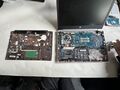
step 1
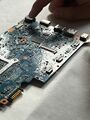
step 2
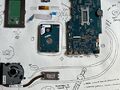
step 3 (read and write components)


formatting on the terminal
reminder to me pr -2 -l 40 test.txt > testpr.txt where > writes to a new file
- tpp - text presentation program
- tpp autoplay:
$ tpp -t autoplay -s 5 exec-test.tpp - comments actually work like this:
–-##/(not as named in the wiki page)
- tpp autoplay:
- we are going with rich a text formatting library for python that allows us:
- to print markdown files from a .py script
- this also means that the markdown files can be converted easily for print*
- has basic styling support (bold, text align etc)
- run bash commands (like in any python script)
- use
$ clearandsleep ()to create page like sequences
- to print markdown files from a .py script
*print from the terminal
- Pandoc can output .md into
- html
- more...
- from html input we could use Weasyprint
- has pagination and Imposition (I think)
- there is also browser tools like this (they seem easy but I'd like to use the terminal here too)
keep in mind:
- pagination
- Imposition
resources
- minerals
- Copper Mining Documentary
- mapping
- calculating empires map
- bureau de etudes