
User:Kim/Mock Assessment (2): Difference between revisions
No edit summary |
|||
| (11 intermediate revisions by the same user not shown) | |||
| Line 1: | Line 1: | ||
''this is the backend for kims mock assessment presentation. you can find the frontend [https://hub.xpub.nl/cerealbox/~kim/mock-frontend/ here]''<br> | |||
''[https://pad.xpub.nl/p/20251105-mockassessment-2 pad with notes form all presentations ]''<br> | |||
<div class="section intro-section"> | <div class="section intro-section"> | ||
= intro = | = intro = | ||
| Line 5: | Line 8: | ||
Two sentences about git (we’ll get to know some more in the process): It is a (quite complex) tool that helps you keep track of changes made in a file and lets you collaborate with others on the same files. | Two sentences about git (we’ll get to know some more in the process): It is a (quite complex) tool that helps you keep track of changes made in a file and lets you collaborate with others on the same files. | ||
This is an attempt to use the git protocol as presentation protocol, thinking through the actions that the software prescribes. The presentation is structured by main tasks (commands) used when working with the software. ''(dont worry if you’re not familiar with them yet, we’ll aim to understand them together)'' | This is an attempt to use the git protocol as presentation protocol, thinking through the actions that the software prescribes. The presentation is structured by main tasks (commands) used when working with the software. ''(dont worry if you’re not familiar with them yet, we’ll aim to understand them together)'' | ||
| Line 23: | Line 25: | ||
In previous projects I have been interested in rendering information visible that remains hidden in common user interfaces. And think of ways how we interact with that information and how it relates to the content already there. | In previous projects I have been interested in rendering information visible that remains hidden in common user interfaces. And think of ways how we interact with that information and how it relates to the content already there. | ||
<div | <div class="projects"> | ||
<div class="project"> | <div class="project"> | ||
[https://hub.xpub.nl/cerealbox/html-club/tnb-web/ Tracing Networks Backwards] ''(browser game based on mediawiki, lets you move through articles only seeing links, backwards)'' | [https://hub.xpub.nl/cerealbox/html-club/tnb-web/ Tracing Networks Backwards] ''(browser game based on mediawiki, lets you move through articles only seeing links, backwards)'' | ||
| Line 81: | Line 83: | ||
gitpub explores how we write and are written by software. ''on a technical level this means, we think we use and write software, but while doing so, additional to our conscious writing (typing), there is a lot more text produced (not directly by us). This additional text is often metadata, used to index and render machine readable what we typed. I want to emphasise that creating text is a reciprocal process and use gitpub to explore how software writes us back, in other words how the different modes of writing that happen influence each other.'' | gitpub explores how we write and are written by software. ''on a technical level this means, we think we use and write software, but while doing so, additional to our conscious writing (typing), there is a lot more text produced (not directly by us). This additional text is often metadata, used to index and render machine readable what we typed. I want to emphasise that creating text is a reciprocal process and use gitpub to explore how software writes us back, in other words how the different modes of writing that happen influence each other.'' | ||
gitpub is a tool in the sense of a “boundary object, connecting different communities of practice.”<ref>Star, S.L. (1994). Misplaced Concretism and Concrete Situations: Feminism, Method, and Information Technology. In: Bowker, G. et al. (eds) Boundary objects and beyond: working with Leigh Star. Cambridge, Massachusetts: The MIT Press – encountered in Prototyping 2024/2025 intro: https://pzwiki.wdka.nl/mediadesign/Prototyping_2024/2025_intro</ref> ''Lets try to unpack this: I already mentioned the cultural embeddedness of the git software. This can be understood as kind of a community of practice. Another community of practice this could connect to are people who practice publishing in quick, urgent and lets say ‘experimental’ ways but are not necessarily or only developers. Using the resources/ technology of the one (git, tech culture) and the approach and material result (questioning hierarchy of text in collaboration / criticality and print copies) of the other holds potential to connect while also question implications of different communities of practice.'' | gitpub is a tool in the sense of a “boundary object, connecting different communities of practice.”<ref>Star, S.L. (1994). Misplaced Concretism and Concrete Situations: Feminism, Method, and Information Technology. In: Bowker, G. et al. (eds) Boundary objects and beyond: working with Leigh Star. Cambridge, Massachusetts: The MIT Press – encountered in Prototyping 2024/2025 intro: https://pzwiki.wdka.nl/mediadesign/Prototyping_2024/2025_intro</ref> ''Lets try to unpack this: I already mentioned the cultural embeddedness of the git software. This can be understood as kind of a community of practice. Another community of practice this could connect to are people who practice publishing in quick, urgent and lets say ‘experimental’ ways but are not necessarily or only developers. Using the resources/ technology of the one (git, tech culture) and the approach and material result (questioning hierarchy of text in collaboration / criticality and print copies) of the other holds potential to connect while also question implications of different communities of practice.'' | ||
[[File:Communities-of-practice-screenshot.png|center|461x461px]] | |||
</div> | </div> | ||
<div class="section commit-section"> | <div class="section commit-section"> | ||
= git commit = | = git commit = | ||
| Line 123: | Line 123: | ||
We’re almost there! the last step to share our changes is the <code>git push</code> command. Looking at ‘push’, gives us a pretty good idea about what this means: to push is to apply pressure against (something), especially for the purpose of moving it (away from you or forward). | We’re almost there! the last step to share our changes is the <code>git push</code> command. Looking at ‘push’, gives us a pretty good idea about what this means: to push is to apply pressure against (something), especially for the purpose of moving it (away from you or forward). | ||
<div class="projects"> | |||
<div class="project"> | |||
From my side, i want to use this moment to share the prototypes I printed so far: | From my side, i want to use this moment to share the prototypes I printed so far: | ||
| Line 136: | Line 138: | ||
Gitpub-prototype-1.1.png|v 0.1 personal reader | Gitpub-prototype-1.1.png|v 0.1 personal reader | ||
</gallery> | </gallery> | ||
</div> | |||
for each iteration of the script I tried to document how they work technically in a graph. | <div class="project"> | ||
for each iteration of the script I tried to document how they work technically in a graph. | |||
<gallery> | <gallery> | ||
Gitpub.svg|v 0.1 (bash) | Gitpub.svg|v 0.1 (bash) | ||
| Line 143: | Line 146: | ||
Gitpubv03.svg|v 0.3 (python) | Gitpubv03.svg|v 0.3 (python) | ||
</gallery> | </gallery> | ||
</div> | |||
</div> | |||
</div> | </div> | ||
<div class="section ref-section"> | <div class="section ref-section"> | ||
= references = | = references = | ||
<references /> | <references /> | ||
</div> | </div> | ||
Latest revision as of 15:39, 6 November 2025
this is the backend for kims mock assessment presentation. you can find the frontend here
pad with notes form all presentations
intro
In the next few minutes I will present gitpub. A project that is based on the git software.
Two sentences about git (we’ll get to know some more in the process): It is a (quite complex) tool that helps you keep track of changes made in a file and lets you collaborate with others on the same files.
This is an attempt to use the git protocol as presentation protocol, thinking through the actions that the software prescribes. The presentation is structured by main tasks (commands) used when working with the software. (dont worry if you’re not familiar with them yet, we’ll aim to understand them together)

git init
previous practice and context
In an existing directory somewhere on our computer, we start with a so called git init. "Init" stands for the act of initialising a git repository. With this command we add the git software to a project (directory).
The directory we initialized already had some content in it. lets take a look at what already there to understand a bit more about git itself but also my own practice.
In previous projects I have been interested in rendering information visible that remains hidden in common user interfaces. And think of ways how we interact with that information and how it relates to the content already there.
Tracing Networks Backwards (browser game based on mediawiki, lets you move through articles only seeing links, backwards)
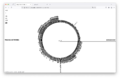
browser version
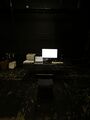
installation at ubik for SI25
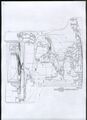
graph printout after 4h of tracing networks backwards


Layer and annual rings (browser extensions show information about website usually hidden by the browser like age or source code comments)
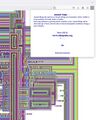
annual rings browser extension
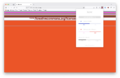
layer browser extension
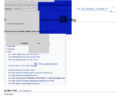
layer browser extension


Terms of servers (markdown based publication readable in the terminal and from the same files output to print booklet)
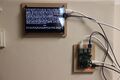
terminal publication

printed output


git context: I have only recently started using git for code documentation but became fascinated with its way of working quickly and moved my personal reader into a git repositry. Git is usually interfaced through platforms such as github, gitlab or gittea. It is culturally situated in development and tech scene (white, male, optimisation driven). The softwares means of collaboration and version control produce a lot of metadata to the code (and text) that is written inside a git repository. Yet this metadata is either neglected or exploited to reinforce hypercapitalist modes of production.
git add
what
Moving on, we want to make some changes to that status quo. The first step for adding changes is git add. As a command, this is quite self explanatory, so lets dive right into what I want to propose.
Gitpub is a tool to create a printed or web-based publication from a git repository including repository metadata. This tool is not bound to any specific environment yet, but could have different interfaces such as a website or a terminal program.
At this point i was asked to say a bit more about metadata.
Historically metadata was used to index books in library catalogs. With increasing digitisation, these were turned into databases. Not only books have metadata, but basically everything we want to index or process by a computer.
Today metadata is deeply embedded in search-engine optimisation, expansion driven, capitalist modes of production and consumption. In that, digital cataloging metadata not only feeds into e-commerce but reinforces proprietary mode of knowledge production and circulation.
Making metadata part of the publication is an act of decentering the main body of a text or work. Here the software in use becomes not just a means to an end of production but presents itself as material, social and political entity. Metadata, usually being text processed by and for experts or machines, is turned into text readable by anyone.
Collaborative production of text poses a crucial part of this project. Its important for me to approach the development of gitpub not from a purely technical side (like a ‘just’ a script) but with exercises that examine collaborative writing of, with and through metadata.
why
With git add, we looked at the what. Since there is not much space for reasoning within git, lets escape the protocol for a second and speak about the why.
gitpub explores how we write and are written by software. on a technical level this means, we think we use and write software, but while doing so, additional to our conscious writing (typing), there is a lot more text produced (not directly by us). This additional text is often metadata, used to index and render machine readable what we typed. I want to emphasise that creating text is a reciprocal process and use gitpub to explore how software writes us back, in other words how the different modes of writing that happen influence each other.
gitpub is a tool in the sense of a “boundary object, connecting different communities of practice.”[1] Lets try to unpack this: I already mentioned the cultural embeddedness of the git software. This can be understood as kind of a community of practice. Another community of practice this could connect to are people who practice publishing in quick, urgent and lets say ‘experimental’ ways but are not necessarily or only developers. Using the resources/ technology of the one (git, tech culture) and the approach and material result (questioning hierarchy of text in collaboration / criticality and print copies) of the other holds potential to connect while also question implications of different communities of practice.

git commit
project metadata
To successfully share the changes made with a public or my collaborators we have two more commands to run. After git add, we follow up with git commit. This will create a snapshot of the current state of our project, a version which we can later return to. In order to store this snapshot properly and make it retrievable for us, a bunch of metadata is created with this command. E.g. Author name and time are recorded and we are asked to formulate a short message, describing the change we made.
So: makes snapshot, produces metadata to index it and make it comprehensible.
if this sounds abstract, lets look at the word ‘commit’, which stands for to do; perform; agreeing or promising loyalty to something: we are committing the change we made to our project
I will not repeat my previous notes to give you a snapshot of the project, you have that, but in a git manner, I will add some metadata:
A brief outline of current status and next steps:
status: proof of concept (python script) that transforms html and markdown files in a git repository to a printable pdf
- nov & dec: articulating my ideas in words and prototypes, develop workshop and interactive formats (that not necessarily involve computer?)
- jan: develop script to a point that I can use it for thesis writing
- feb - march 26: implement (minimal viable) features into the tool, think about composition / layout
- apr - june: make the tool self contained / sharable, test tool collaboratively in different settings and with different prompts, implement adjustments
july: documentation and presentation
Some resources and contexts: I understand Gitpub as situated in a lively ecology of experimental publishing tools, practices and concepts - some of which you might be familiar with, just to name a few here.
Including collectives such as Open source publishing or Pre Post print, etherpad based tools for collective writing and publishing like octomode, etherdump and adjacent or converging concepts like Aesthetic programming or Gitterature.
git push
show prototypes
We’re almost there! the last step to share our changes is the git push command. Looking at ‘push’, gives us a pretty good idea about what this means: to push is to apply pressure against (something), especially for the purpose of moving it (away from you or forward).
From my side, i want to use this moment to share the prototypes I printed so far:
v 0.1 is a copy of my personal reader (bash script)
v 0.3 is a copy of my personal reader (python script)
v 0.3 is a copy of writing from the middle which I copied from xpup gittea (python script)

printed prototypes v 0.1 & v 0.3
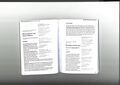
scan v 0.3 personal reader
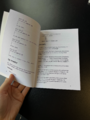
v 0.1 personal reader


for each iteration of the script I tried to document how they work technically in a graph.
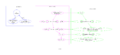
v 0.1 (bash)
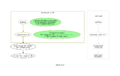
v 0.2 (python)
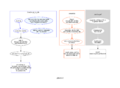
v 0.3 (python)


references
- ↑ Star, S.L. (1994). Misplaced Concretism and Concrete Situations: Feminism, Method, and Information Technology. In: Bowker, G. et al. (eds) Boundary objects and beyond: working with Leigh Star. Cambridge, Massachusetts: The MIT Press – encountered in Prototyping 2024/2025 intro: https://pzwiki.wdka.nl/mediadesign/Prototyping_2024/2025_intro