
Terms of servers: Difference between revisions
mNo edit summary |
|||
| (33 intermediate revisions by 2 users not shown) | |||
| Line 5: | Line 5: | ||
== Images == | == Images == | ||
<gallery> | |||
ToS-doc-3.jpeg|Terms of Servers Title Screen (wip at the studio) | |||
ToS-doc-1.jpg|Terms of Servers installed at the Telecommueum next to the Archive | |||
ToS-doc-2.JPG|close-up of the installation at the museum | |||
ToS-doc-4.jpg|Cover of the print publication | |||
ToS-doc-5.jpeg|setting up the installation at the museum | |||
</gallery> | |||
== Process == | == Process == | ||
[[File:Curses.jpg|thumb|tpp --> ncurses|328x328px]] | |||
https://pad.xpub.nl/p/si27-claudio-kim | |||
https://pad.xpub.nl/p/si27-claudio-kim-text | |||
process documentation on kims wiki: [[User:Kim/Special Issue 27/uptime]] | |||
== Code == | == Code == | ||
code tour | code tour | ||
... | |||
<syntaxhighlight lang="python"> | |||
from rich.console import Console | |||
from rich import print | |||
from rich.markdown import Markdown | |||
from rich.align import Align | |||
from time import sleep | |||
import os | |||
import sys | |||
</syntaxhighlight> | |||
... | |||
<syntaxhighlight lang="python"> | |||
#variable declaration | |||
time_lines=n | |||
title="" | |||
</syntaxhighlight> | |||
... | |||
<syntaxhighlight lang="python"> | |||
console = Console() | |||
</syntaxhighlight> | |||
... | |||
<syntaxhighlight lang="python"> | |||
with open("path/to/file.md") as name: | |||
md_name = Markdown(name.read()) | |||
with console.capture() as capture: | |||
console.print(md_name) | |||
</syntaxhighlight> | |||
... | |||
<syntaxhighlight lang="python"> | |||
all_lines_name = capture.get().splitlines() | |||
</syntaxhighlight> | |||
... | |||
<syntaxhighlight lang="python"> | |||
def exaust(file, time): | |||
while file: | |||
page="\n".join(file[:5]) | |||
sys.stdout.write(page) | |||
sleep(time) | |||
file=file[5:] | |||
</syntaxhighlight> | |||
... | |||
<syntaxhighlight lang="python"> | |||
while True: | |||
copy_name = all_lines_name | |||
console.clear() | |||
print("") | |||
exaust(copy_name, time_lines) | |||
sleep() | |||
print(Align.center("\n$ script.sh")) | |||
print(Align.center(os.popen(script).read())) | |||
sleep() | |||
sleep() | |||
</syntaxhighlight> | |||
== Things we didn't end up using == | == Things we didn't end up using == | ||
On our way towards the practical realization of the project we ran into multiple possible ways we could achieve presenting formatted text. | On our way towards the practical realization of the project we ran into multiple possible ways we could achieve presenting formatted text in the terminal. | ||
Initially we had though of using various text manipulating tools from the linux core tools: | Initially we had though of using various text manipulating tools from the linux core tools: | ||
| Line 25: | Line 111: | ||
*printf | *printf | ||
*ANSI escape codes (which make the file unreadable) | *ANSI escape codes (which make the file unreadable) | ||
these are documented here: https://www.baeldung.com/linux/formatting-text-in-terminals, https://coding-bootcamps.com/paginate-texts-in-linux/, https://www.spsanderson.com/steveondata/posts/2025-01-24/ | |||
Afterwards, we ran into '''tpp''' (text presentation program), a ruby-ncurses presentation tool that works with files written with some special description synthax (ex. -title, -newpage). | === tpp === | ||
Afterwards, we ran into '''[https://github.com/cbbrowne/tpp tpp]''' (text presentation program), a ruby-ncurses presentation tool that works with files written with some special description synthax (ex. -title, -newpage). | |||
Tpp looked like a solution for a while, it even has the possibility to run commands! But we were having issues to make it work on Kim's computer and when you actually ran commands inside of it the output was displayed at the bottom of the file. | Tpp looked like a solution for a while, it even has the possibility to run commands! But we were having issues to make it work on Kim's computer and when you actually ran commands inside of it the output was displayed at the bottom of the file. | ||
Working with tpp looks fun but it also does not seem to be the best for large quantities of text.(as presentation files become unreadable) | Working with tpp looks fun but it also does not seem to be the best for large quantities of text.(as presentation files become unreadable) | ||
At the same time of this discovery, Joseph mentioned '''urwid''', a python console user interface library for unix-like OSses. | === urwid === | ||
At the same time of this discovery, Joseph mentioned '''[https://urwid.org/ urwid]''', a python console user interface library for unix-like OSses. | |||
It allows for many possiblities like widgets for building custom TUI, animations, style support, but we also were struggling with making sense of the documentation. | It allows for many possiblities like widgets for building custom TUI, animations, style support, but we also were struggling with making sense of the documentation. | ||
'''Xdotool''' is an automation tool that allows for keyboard automation and more, at some point we were thinking of making a script that would open tpp presentations and send keyboard input every x seconds to cycle through them, the files would then be intermitted by linux commands. We did not settle for something too far from this in terms of logic, but we dropped this idea since xdotool works only with a desktop environment. | === Xdotool === | ||
'''[https://github.com/jordansissel/xdotool Xdotool]''' is an automation tool that allows for keyboard automation and more, at some point we were thinking of making a script that would open tpp presentations and send keyboard input every x seconds to cycle through them, the files would then be intermitted by linux commands. We did not settle for something too far from this in terms of logic, but we dropped this idea since xdotool works only with a desktop environment. | |||
After some time thinking of how we might solve this, Joseph came up with another recommendation: a python library called '''pyboxen'''. | === Pypoxen === | ||
After some time thinking of how we might solve this, Joseph came up with another recommendation: a python library called '''[https://github.com/savioxavier/pyboxen pyboxen]'''. | |||
Pyboxen is built on top of another library called '''rich''' (the one that we ended up using) and it is a python port of another popular npm library called boxen. | Pyboxen is built on top of another library called '''rich''' (the one that we ended up using) and it is a python port of another popular npm library called boxen. | ||
It allows to make boxes, titles, and controlled formatting. We found out we did not need that much and so we started to look into rich (that also allows for less costumizable boxed frames btw). | It allows to make boxes, titles, and controlled formatting. We found out we did not need that much and so we started to look into rich (that also allows for less costumizable boxed frames btw). | ||
=== Textualize === | |||
Michael helped us writing what is now the final code, he was suggesting to look into '''[https://www.textualize.io/ textualize]''', another library from the same creator of rich, but in the end we had what we need and textualize was adding another (interesting) layer of abstraction we needed to wrap our head around in a very limited amount of time. | |||
At some point it really helped | At some point it really helped us to sit down and list our essentials for this project, we needed a way to format text, but to also run both linux commands and custom bash scripts. We then decided to settle for python and both the rich and os library. | ||
== Print == | |||
=== Steps === | |||
the following 3 steps enabled us to turn a folder of markdown files into a ready to print booklet, only using terminal commands | |||
pandoc *.md -o book.html | |||
[https://pandoc.org/ Pandoc] is a document converter. We grab all .md files from the current directory and output them in one .html file. To ensure the right order of files, filenames were numbered. | |||
weasyprint -s stylesheet.css book.html book.pdf | |||
[https://weasyprint.org/ Weasyprint] allows us to attach a stylesheet with the -s option while converting the html into a pdf | |||
pdfbook2 --paper=a4paper --short-edge --no-crop book.pdf | |||
To make the pdf ready for print we need imposition. [http://man.he.net/man1/pdfbook2 pdfbook2] takes care of that and enabled us to define some other specifics like paper format and size. | |||
=== Resources === | |||
The following (wiki) pages were super helpful to come to the set-up we used: | |||
* [[Pandoc]] especially this section: [[Pandoc#PAD_to_MARKDOWN_to_HTML_to_PDF_to_BOOKLET_PDF]]''' | |||
* [[Weasyprint]] | |||
* [[CSS Print]] (for step 2 defining the stylesheet for the pdf) | |||
== What's next == | == What's next == | ||
We are interested in | We are interested in finding out how we could distribute this publication inside of the terminal, but independently from when we first made it public at the Telecom Museum Rotterdam, the following is a list of open possibilities: | ||
* uv, pip | * [https://docs.astral.sh/uv/ uv], pip (make a python project and then have people install it via pip install) | ||
* telnet (https://en.wikipedia.org/wiki/Telnet , https://www.404media.co/queer-online-zine-new-session-telnet/) | |||
* telnet | |||
* ssh guest user | * ssh guest user | ||
the last option would require us to host a server of our own and set up a guest user with no sudo rights. (we can not do this on our current server since ssh keys are mandatory for security). On connecting to the server, a process would open that displays the publication. <br> | |||
Arthur whom we met at [[User:Kim/Stations, Skills, Resources/Pre Post Print|Pre Post Print]] showed a similar approach with a server their community set up: https://arthur.bebou.netlib.re/crisco-des (this seems to be offline rn, but will come back on eventually so I put it here anyway) | |||
Latest revision as of 14:30, 16 July 2025
Intro
Terms of servers is a terminal based publication that runs on a temporary, communal server called Cerealbox. Working with the server for almost a year now evoked questions around its materiality and reliability. We discuss these questions among us, the users, but also direct them towards Cerealbox itself. Terms of servers' form is malleable, it can be read in a computer shell or as printed text.
Images
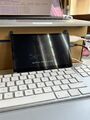
Terms of Servers Title Screen (wip at the studio)
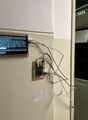
Terms of Servers installed at the Telecommueum next to the Archive
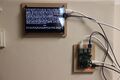
close-up of the installation at the museum
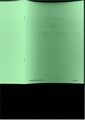
Cover of the print publication
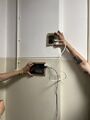
setting up the installation at the museum


Process

https://pad.xpub.nl/p/si27-claudio-kim
https://pad.xpub.nl/p/si27-claudio-kim-text
process documentation on kims wiki: User:Kim/Special Issue 27/uptime
Code
code tour ...
from rich.console import Console

from rich import print

from rich.markdown import Markdown

from rich.align import Align

from time import sleep

import os

import sys
...
#variable declaration
time_lines=n
title=""
...
console = Console()
...
with open("path/to/file.md") as name:
    md_name = Markdown(name.read())

with console.capture() as capture:
    console.print(md_name)
...
all_lines_name = capture.get().splitlines()
...
def exaust(file, time):
    while file:
        page="\n".join(file[:5])
        sys.stdout.write(page)
        sleep(time)
        file=file[5:]
...
while True:
    copy_name = all_lines_name

    console.clear()

    print("")
    exaust(copy_name, time_lines)
    sleep()

    print(Align.center("\n$ script.sh"))
    print(Align.center(os.popen(script).read()))

    sleep()
sleep()
Things we didn't end up using
On our way towards the practical realization of the project we ran into multiple possible ways we could achieve presenting formatted text in the terminal.
Initially we had though of using various text manipulating tools from the linux core tools:
- tr
- pr
- cut
- col
- sed
- printf
- ANSI escape codes (which make the file unreadable)
these are documented here: https://www.baeldung.com/linux/formatting-text-in-terminals, https://coding-bootcamps.com/paginate-texts-in-linux/, https://www.spsanderson.com/steveondata/posts/2025-01-24/
tpp
Afterwards, we ran into tpp (text presentation program), a ruby-ncurses presentation tool that works with files written with some special description synthax (ex. -title, -newpage). Tpp looked like a solution for a while, it even has the possibility to run commands! But we were having issues to make it work on Kim's computer and when you actually ran commands inside of it the output was displayed at the bottom of the file. Working with tpp looks fun but it also does not seem to be the best for large quantities of text.(as presentation files become unreadable)
urwid
At the same time of this discovery, Joseph mentioned urwid, a python console user interface library for unix-like OSses. It allows for many possiblities like widgets for building custom TUI, animations, style support, but we also were struggling with making sense of the documentation.
Xdotool
Xdotool is an automation tool that allows for keyboard automation and more, at some point we were thinking of making a script that would open tpp presentations and send keyboard input every x seconds to cycle through them, the files would then be intermitted by linux commands. We did not settle for something too far from this in terms of logic, but we dropped this idea since xdotool works only with a desktop environment.
Pypoxen
After some time thinking of how we might solve this, Joseph came up with another recommendation: a python library called pyboxen. Pyboxen is built on top of another library called rich (the one that we ended up using) and it is a python port of another popular npm library called boxen. It allows to make boxes, titles, and controlled formatting. We found out we did not need that much and so we started to look into rich (that also allows for less costumizable boxed frames btw).
Textualize
Michael helped us writing what is now the final code, he was suggesting to look into textualize, another library from the same creator of rich, but in the end we had what we need and textualize was adding another (interesting) layer of abstraction we needed to wrap our head around in a very limited amount of time.
At some point it really helped us to sit down and list our essentials for this project, we needed a way to format text, but to also run both linux commands and custom bash scripts. We then decided to settle for python and both the rich and os library.
Steps
the following 3 steps enabled us to turn a folder of markdown files into a ready to print booklet, only using terminal commands
pandoc *.md -o book.html
Pandoc is a document converter. We grab all .md files from the current directory and output them in one .html file. To ensure the right order of files, filenames were numbered.
weasyprint -s stylesheet.css book.html book.pdf
Weasyprint allows us to attach a stylesheet with the -s option while converting the html into a pdf
pdfbook2 --paper=a4paper --short-edge --no-crop book.pdf
To make the pdf ready for print we need imposition. pdfbook2 takes care of that and enabled us to define some other specifics like paper format and size.
Resources
The following (wiki) pages were super helpful to come to the set-up we used:
- Pandoc especially this section: Pandoc#PAD_to_MARKDOWN_to_HTML_to_PDF_to_BOOKLET_PDF
- Weasyprint
- CSS Print (for step 2 defining the stylesheet for the pdf)
What's next
We are interested in finding out how we could distribute this publication inside of the terminal, but independently from when we first made it public at the Telecom Museum Rotterdam, the following is a list of open possibilities:
- uv, pip (make a python project and then have people install it via pip install)
- telnet (https://en.wikipedia.org/wiki/Telnet , https://www.404media.co/queer-online-zine-new-session-telnet/)
- ssh guest user
the last option would require us to host a server of our own and set up a guest user with no sudo rights. (we can not do this on our current server since ssh keys are mandatory for security). On connecting to the server, a process would open that displays the publication.
Arthur whom we met at Pre Post Print showed a similar approach with a server their community set up: https://arthur.bebou.netlib.re/crisco-des (this seems to be offline rn, but will come back on eventually so I put it here anyway)