
Thermal printers: Difference between revisions
(→Python) |
|||
| (4 intermediate revisions by the same user not shown) | |||
| Line 39: | Line 39: | ||
===Python=== | ===Python=== | ||
With the | With the '''escpos Python library''' you can use the printer from a Python script. | ||
https://pypi.org/project/escpos/ | * to install the library: https://pypi.org/project/escpos/ | ||
* documentation: https://python-escpos.readthedocs.io/en/latest/user/usage.html | |||
* API documentation (all the functions you can use): https://python-escpos.readthedocs.io/en/latest/api/escpos.html | |||
====USB==== | |||
You can choose to connect over an "usb" connection" | |||
<syntaxhighlight lang="python"> | |||
from escpos.printer import Usb | |||
p = Usb(0x04b8, 0x0e28) | |||
# this is the specific nr for this printer | |||
# you can find it with $ lsusb | |||
p.text("Hello World\n") | |||
</syntaxhighlight> | |||
Or a "file handler" connection: | |||
<syntaxhighlight lang="python"> | |||
from escpos.printer import Usb | |||
p2 = File("/dev/usb/lp0") | |||
p2.text("HELLO!\n") | |||
</syntaxhighlight> | |||
====network==== | |||
<syntaxhighlight lang="python"> | <syntaxhighlight lang="python"> | ||
Latest revision as of 17:14, 1 June 2026
a.k.a. receipt printers
We have the following thermal printers at XPUB:
Epson TM20III

Command line
Plug the USB into your computer or server first.
In Linux/Mac, the printer should appear at one of the /dev/ sockters, which should be a path similar to:
/dev/usb/lp0
Try to send some text to the printer:
$ echo "hello" > /dev/usb/lp0
If you get an permission denied error, you can check the permissions of the socket of the printer:
$ ls -la /dev/usb/lp0
Which returns something like the following:
crw-rw---- 1 root lp 180, 2 Nov 6 12:48 /dev/usb/lp2
In this case, the printer socket is owned by the user root and by the group lp.
With the groups command you can check if you are part of the lp group:
$ groups
If not, you can add yourself with:
$ sudo addgroup USERNAME lp
Python
With the escpos Python library you can use the printer from a Python script.
- to install the library: https://pypi.org/project/escpos/
- documentation: https://python-escpos.readthedocs.io/en/latest/user/usage.html
- API documentation (all the functions you can use): https://python-escpos.readthedocs.io/en/latest/api/escpos.html
USB
You can choose to connect over an "usb" connection"
from escpos.printer import Usb

p = Usb(0x04b8, 0x0e28)
# this is the specific nr for this printer
# you can find it with $ lsusb

p.text("Hello World\n")
Or a "file handler" connection:
from escpos.printer import Usb

p2 = File("/dev/usb/lp0")
p2.text("HELLO!\n")
network
from escpos.printer import Network
kitchen = Network("145.24.131.103")
#EPSON Receipt Printer. Printer IP Address will be spit out when plugged
From: User:Ohjian/XPUB_1#Code:_Good_Bye_Aymeric,_Hello_Epson_Printer
Gallery
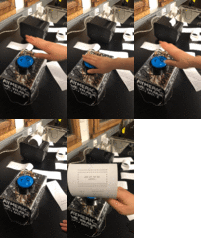
Cocktail generator made for Aymeric's goodbye party in action! (Who made it? Jian and Chae?), see also: SI_17_-_Productive_Play#Cocktail_Generator_for_Aymeric's_Goodbye_Party_(with_Jian) and User:Ohjian/XPUB_1#Cocktail_Generator
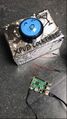
Cocktail generator setup

